mxR 0.7.1 · CI/CD/CT for Maximo Manage · updated 8 November 2026
Ship Maximo changes the way Maximo ships work.
mxR is CI, CD and CT for Maximo: continuous integration, continuous delivery and continuous testing. It is the step inside your pipeline that knows Maximo. Each change becomes an mxR work order, a release record with Maximo-style statuses: approved, deployed to DEV, then UAT, then PROD, tested on each, and closed. Start from a Git commit, from the versions mxR saves when you have no Git, or from what differs between two environments.
Read the run guide · Get mxR free
- Free · Apache-2.0
- Captured on Manage 9.2.237
- One API key per environment for hot changes
- Runs inside Azure DevOps, GitHub Actions, GitLab CI, Jenkins or Tekton
- Proven on Manage 9.2.232 and 9.2.237
- Thirteen commands
Where mxR sits
- A Git commit, a saved version, or two sites (A change) — a change under hot/, or what differs between DEV and UAT
- Azure DevOps, GitHub Actions, GitLab CI, Jenkins, Tekton (Your runner) — triggers, stages, approval screens and logs, as today
- mxr plan · mxr approve · mxr start (The mxR step) — a Maximo work order: the tier, the ordered deploy, the Maximo tests
- DEV → UAT → PROD (Your environments) — the same work order, one environment at a time, closed at COMP
Four words, as mxR uses them
mxR borrows Maximo's words so an administrator reads a release the way they read work. Here is what each one means on this page.
- Work order — A release record kept by mxR. One change on its way to production, with the statuses WAPPR, APPR, INPRG, COMP and CAN. It lives in your repo folder under .mxr/runs, not in Work Order Tracking.
- Site — An environment you deploy to. DEV, UAT or PROD: one Manage you deploy to, described in sites/<NAME>.yaml. It is not a Maximo SITEID.
- Tier — How big the job is. HOT for scripts and screens, in minutes over REST. RESTART for server settings. REBUILD for Java and database changes, with a window and a backup.
- Gate — What an environment asks for. A list in mxr.yaml. DEV asks for nothing. UAT asks for a backup reference. PROD asks for a backup, a change window and an approval.
One change, DEV to UAT to PROD
One script change, start to finish. Every other way of using mxR is a variation of these nine steps.
- mxr export --site DEV pulls what is live into your folder: scripts, screens and settings as files.
- Edit hot/scripts/WO.AUTOFILL.py. With Git, commit it. Without Git, the next mxr command records the version.
- mxr plan reads what changed, picks HOT, and raises WO1001 in WAPPR.
- mxr start WO1001 previews each item, deploys in order to DEV, then runs the built-in checks (script compile, smoke, golden screens) and your own API and UI tests.
- mxr start WO1001 --site UAT --backup-ref db2-2026-10-31 deploys the same version to UAT once the backup gate is met.
- mxr approve WO1001 --window "Sat 02:00" records who approved PROD, and when it may run.
- mxr start WO1001 --site PROD --window "Sat 02:00" deploys the version that passed UAT, not whatever is in the folder that night.
- If a gate or a test fails, the work order holds INPRG with one failure code and prints its runbook. Run mxr start again to resume.
- mxr history list (or git log) shows every version; .mxr/runs/WO1001 holds the record of each run.
API access grows with the tier. A hot change needs one API key per environment. A RESTART also needs access to the ManageWorkspace through the cluster API, and a REBUILD adds a bucket and the admin image.
How CI/CD works today
A developer commits to Git. A pipeline tool picks the commit up, builds it, tests it and deploys it to the next environment, and keeps the approvals and the logs. The same commit moves from DEV to UAT to PROD.
- Commit (Git) — the change, reviewed and merged
- Build (Pipeline) — compile and package
- Test (Pipeline) — unit and integration tests
- Deploy (Pipeline) — to the next environment
- DEV → UAT → PROD (Environments) — the same commit, one environment at a time
The pipeline tool is the runner. It triggers, schedules, holds approvals and keeps logs, and it runs whatever step you give it. For a container or a web app, that step already knows what it is deploying.
What a Maximo change needs
A Maximo change is a set of records and settings inside a running Manage: automation scripts with launch points and variables, Application Designer screens, security groups and signature options, object structures, endpoints and reports, Migration Manager packages, MAF apps, domains, workflows and cron tasks. Moving them safely takes four things.
- Tier — Hot, restart or rebuild. A script goes in through REST in minutes. A JVM option is a pod restart. Java or a DBC script is a new build, with a window and a backup reference.
- Order — Dependencies first. Domains before object structures, conditions before scripts, screens before security grants, workflows before escalations: one written order.
- Preview — Compared with the live site. Each item is checked against the site before anything is pushed: create, update or unchanged. A guard holds a push that would break a reference.
- Maximo tests — Tests that know Maximo. Jython compiled on the site, the cron task run, the integration message traced, and every screen opened against a known good day.
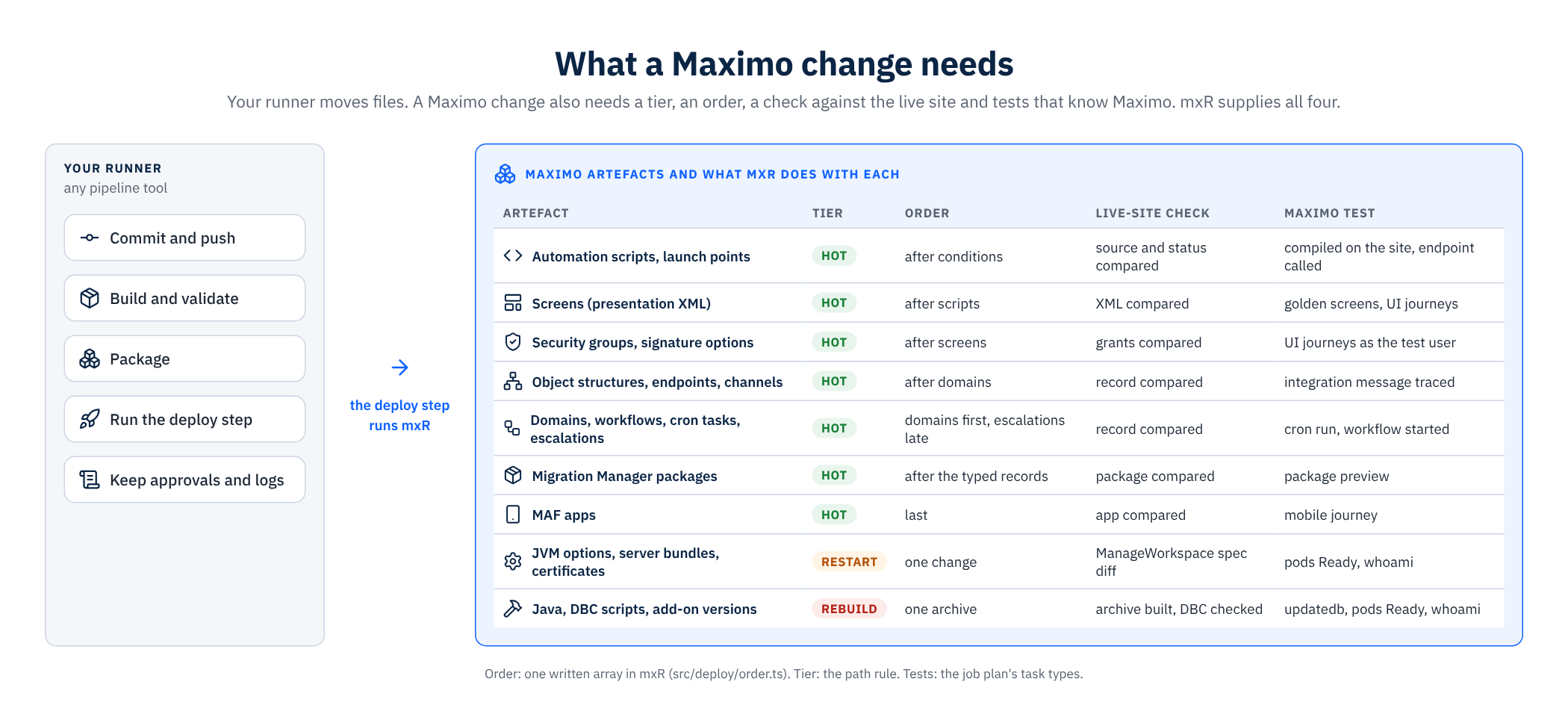
Where mxR fits: one step in your deploy stage
Your runner keeps the triggers, the stages, the approval screens and the logs. mxR is the step inside the deploy stage that knows Maximo, so the pipeline your team runs today stays as it is.
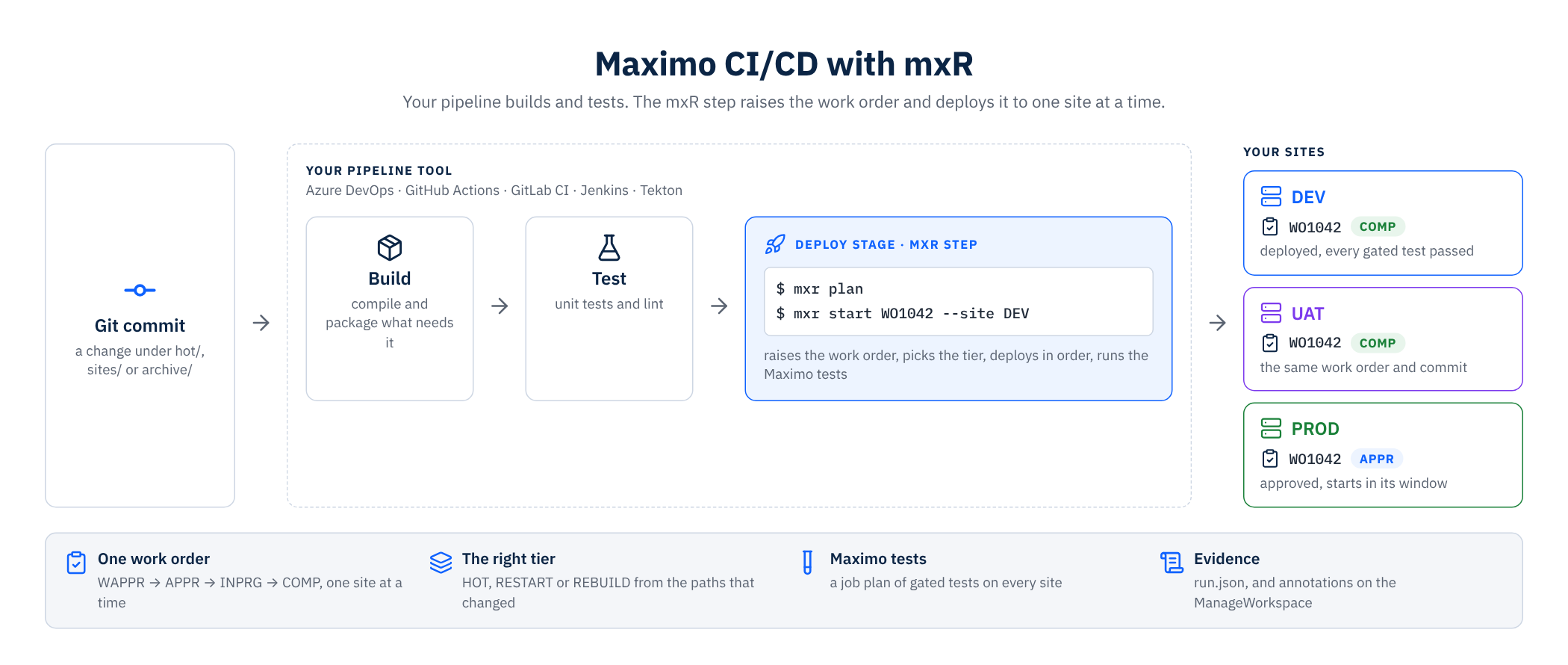
- Your runner keeps — Triggers, stages, approvals, logs. Azure DevOps Pipelines, GitHub Actions, GitLab CI, Jenkins or Tekton, set up the way your team runs them today.
- mxR adds — The work order and everything Maximo. The work order with Maximo's own statuses, the tier, the ordered deploy with its preview, the Maximo tests, and the evidence in run.json and on the ManageWorkspace.
The row-by-row comparison with Azure DevOps, GitHub Actions, GitLab CI, Jenkins and Migration Manager by hand is in the documentation, under Next to your pipeline tool.
An example pipeline
Two commands in any runner. Here they run as a GitHub Actions job on every push to main. Azure DevOps, GitLab CI and Jenkins run the same two lines in a script step, and mxr pipeline render writes the Tekton PipelineRun.
.github/workflows/maximo.yml
name: Maximo deploy
on:
  push:
    branches: [main]

jobs:
  dev:
    runs-on: ubuntu-latest
    steps:
      - uses: actions/checkout@v4
        with: { fetch-depth: 0 }          # mxr plan reads the Git diff
      - uses: actions/setup-node@v4
        with: { node-version: 22 }
      - run: npm install -g https://assetize.com.au/mxr/releases/v0.7.1/mxr-0.7.1.tgz
      - name: Raise the work order and deploy it to DEV
        env:
          MXR_DEV_APIKEY: ${{ secrets.MXR_DEV_APIKEY }}
        run: |
          WO=$(mxr plan --from ${{ github.event.before }} --json | jq -r .wo)
          mxr start "$WO" --site DEV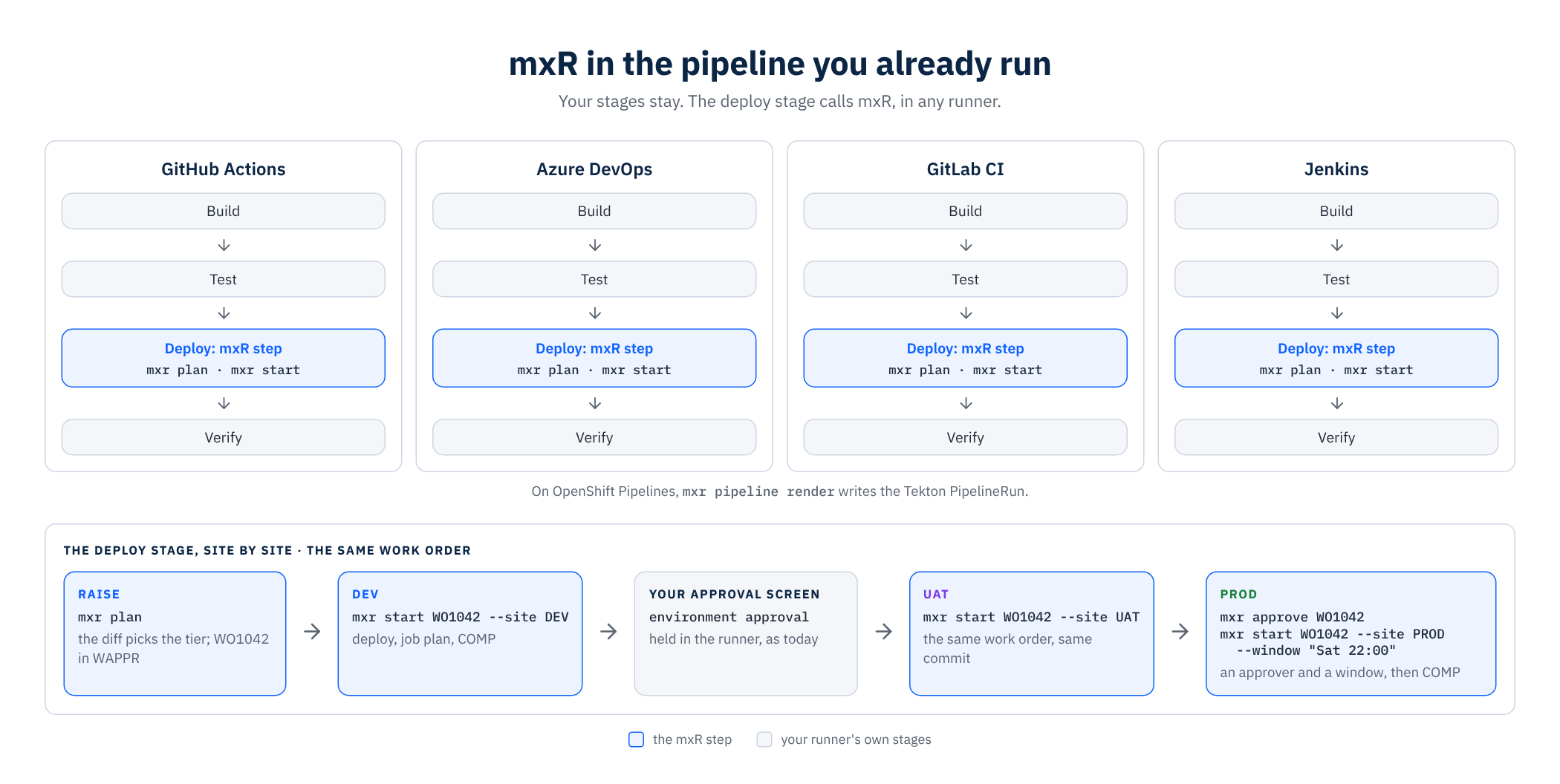
mxr plan reads the push, picks the tier and raises the work order; mxr start deploys it to DEV, runs the job plan and closes it at COMP. The exit code tells the runner what happened: 0 done, 1 a task failed, 2 a gate held it, 3 infrastructure or sign-in, 4 bad input. The key comes from the runner's secret store.
From Git: commit, plan, approve, start
You commit a change under hot/. mxr plan reads the Git diff, picks HOT, RESTART or REBUILD by one written rule and raises the work order. Your pipeline then runs mxr start on DEV, and the same work order moves on to UAT and PROD.
- Commit under hot/ (Git) — scripts, screens, domains, workflows
- mxr plan (WAPPR) — the tier, and the work order with its job plan
- mxr approve (APPR) — who approved, and when
- mxr start (INPRG → COMP) — deploy, job plan, close
- UAT, then PROD (Next sites) — the same work order and commit
| What changed | Tier | What happens | Needs |
|---|---|---|---|
| hot/**, tests/**, jobplans/** | HOT | Preview every item, apply in the hard-coded order through REST and MXR.AGENT, record every item in run.json, run the job plan. Minutes. | The API key |
| Any other sites/*.yaml key: the cr: overlay (server bundles, JVM options, JMS, imported certificates, persistent volumes) | RESTART | Merge the overlay into the ManageWorkspace spec and wait for Ready within the restart timeout. | Cluster access |
| archive/**, or the site-file keys components, languages, buildTag, archives | REBUILD | Build <name>-<gitsha>.zip (Maven against the admin-image jars, DBC checks, dbversion bump), upload it, HEAD it from inside the cluster, patch the ManageWorkspace, wait for pods Ready, whoami answering and maxinst exited 0. Behind a backup gate and a window; recovered by a person from the runbook. | Cluster, bucket, admin image |
No Git: change, plan, approve, start
A customer without Git runs mxR the same way. Every mxr command first records the files it manages in .mxr/history when they changed, so there is always an answer to what changed, when and by whom. mxr plan measures from the version mxr export recorded, and the work order deploys the version it recorded.
- Edit under hot/ (Your folder) — scripts, screens, domains, workflows
- A new version (Recorded) — saved by the next mxr command, only when something changed
- mxr plan (WAPPR) — the tier, from what changed since the last export or deploy
- mxr approve, mxr start (APPR → COMP) — the version the work order recorded is what is deployed
- mxr history export-git (Later, with Git) — one commit per version, with who and when
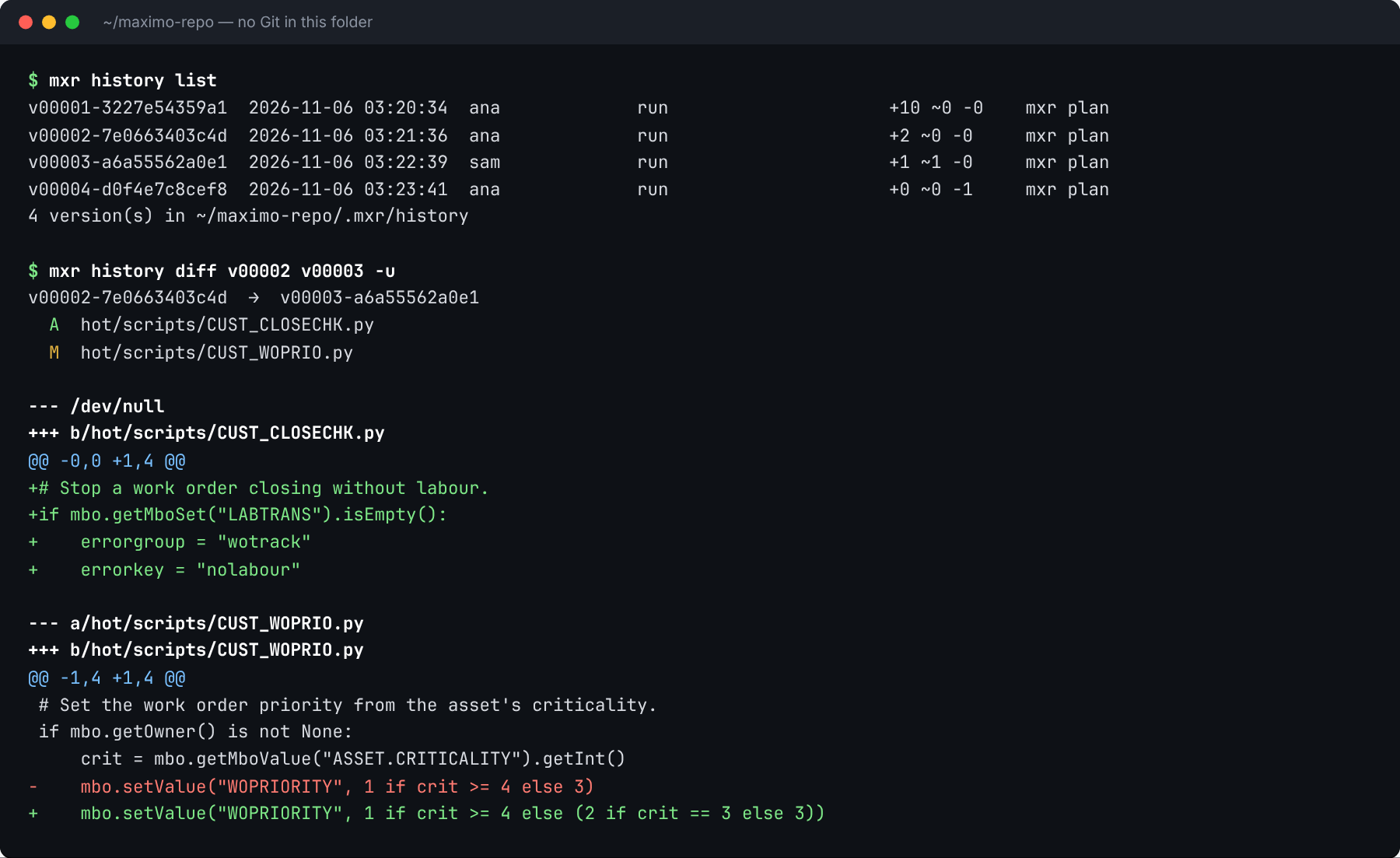
From one site to the next
For changes built on DEV, mxr promote plan --from DEV --to UAT compares the two sites item by item, child rows included, and raises a work order from what differs. The administrator approves that exact list, and mxr start reads DEV again before it deploys.
| Group | What it holds | What mxr start does |
|---|---|---|
| New | On DEV, missing on UAT | Promotes it |
| Changed | On both, and DEV has something to write: an attribute, or a child row to add or change | Promotes it |
| Only on UAT | On UAT, missing on DEV | Keeps it as it is |
| Excluded | Endpoints, system properties, cron schedules, group members and your own patterns | Holds it back and shows why |
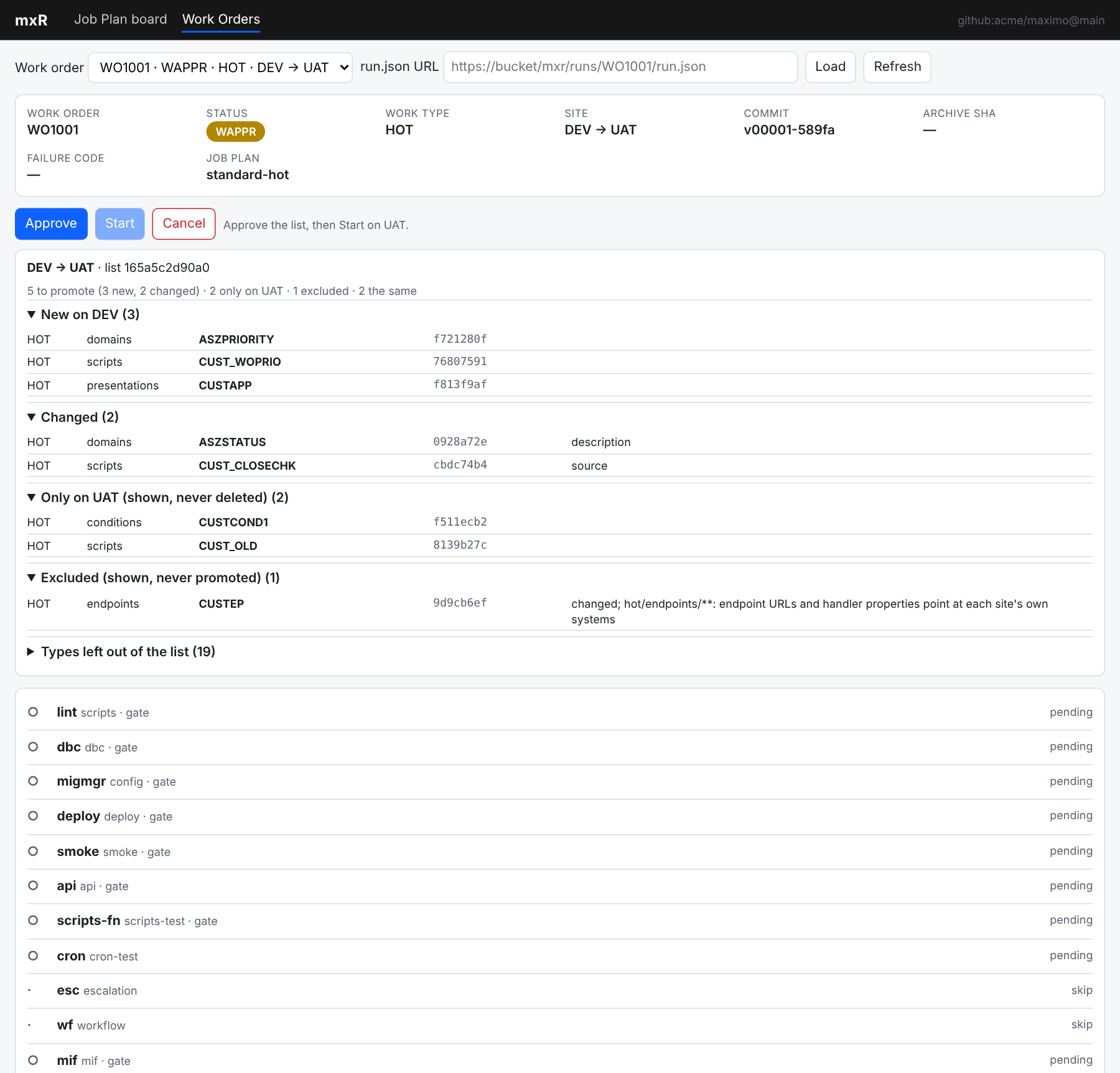
DEV to UAT
mxr promote plan --from DEV --to UAT --dry-run   # print the list
mxr promote plan --from DEV --to UAT             # raise the work order with the list attached
mxr approve WO1042                               # the administrator approves the exact list
mxr start WO1042                                 # read DEV again, promote to UAT, run the job plan, COMP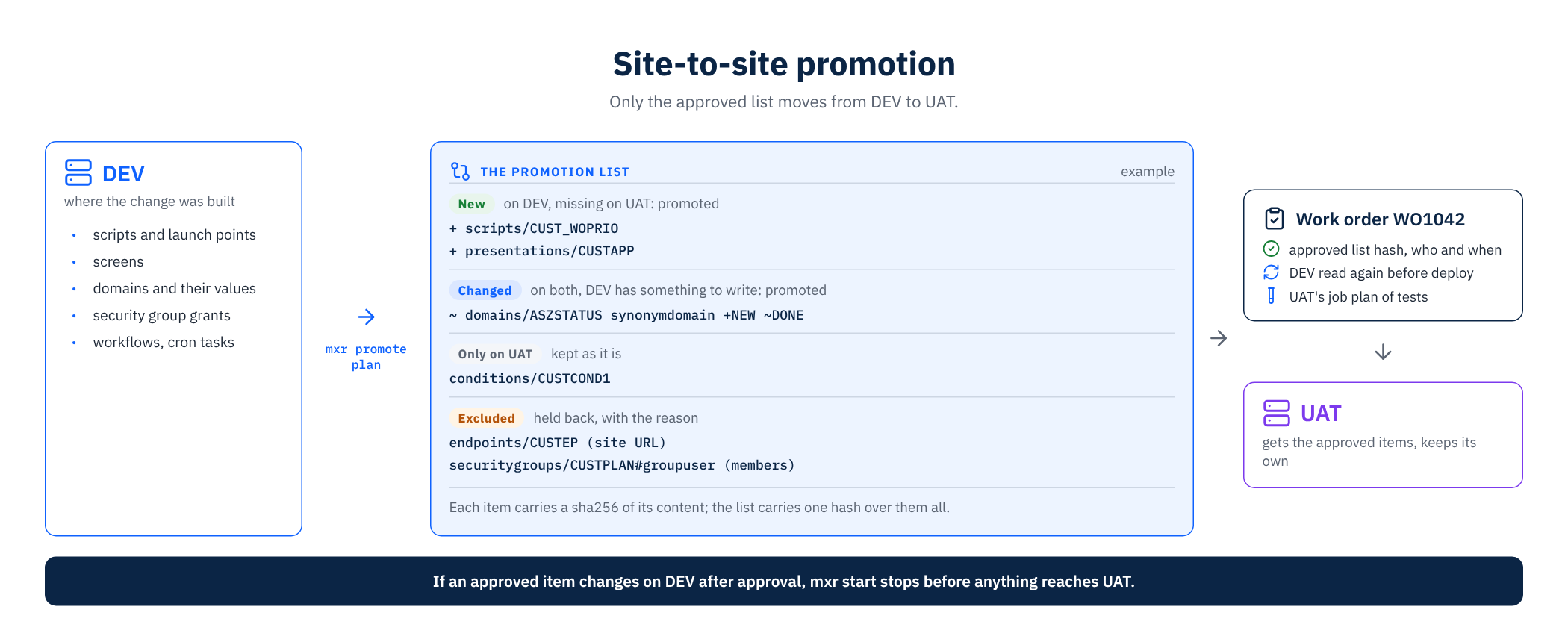
The board and the Work Order screen
mxr ui serves a Job Plan board and a Work Order screen on localhost. A Maximo admin drags a task into an environment, flips its gate and saves; with Git, the save is a commit. The Work Order screen shows the same record the CLI prints.
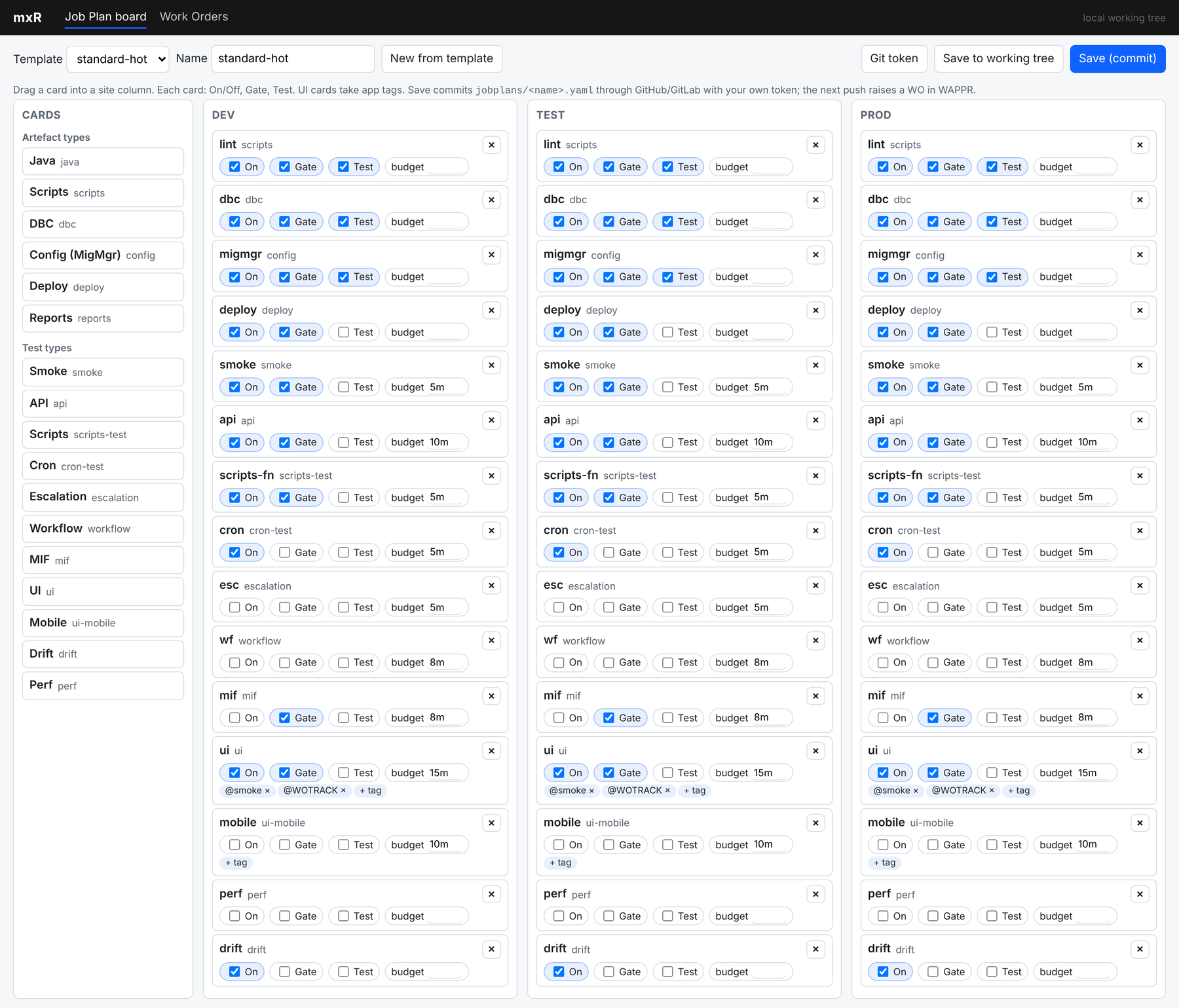
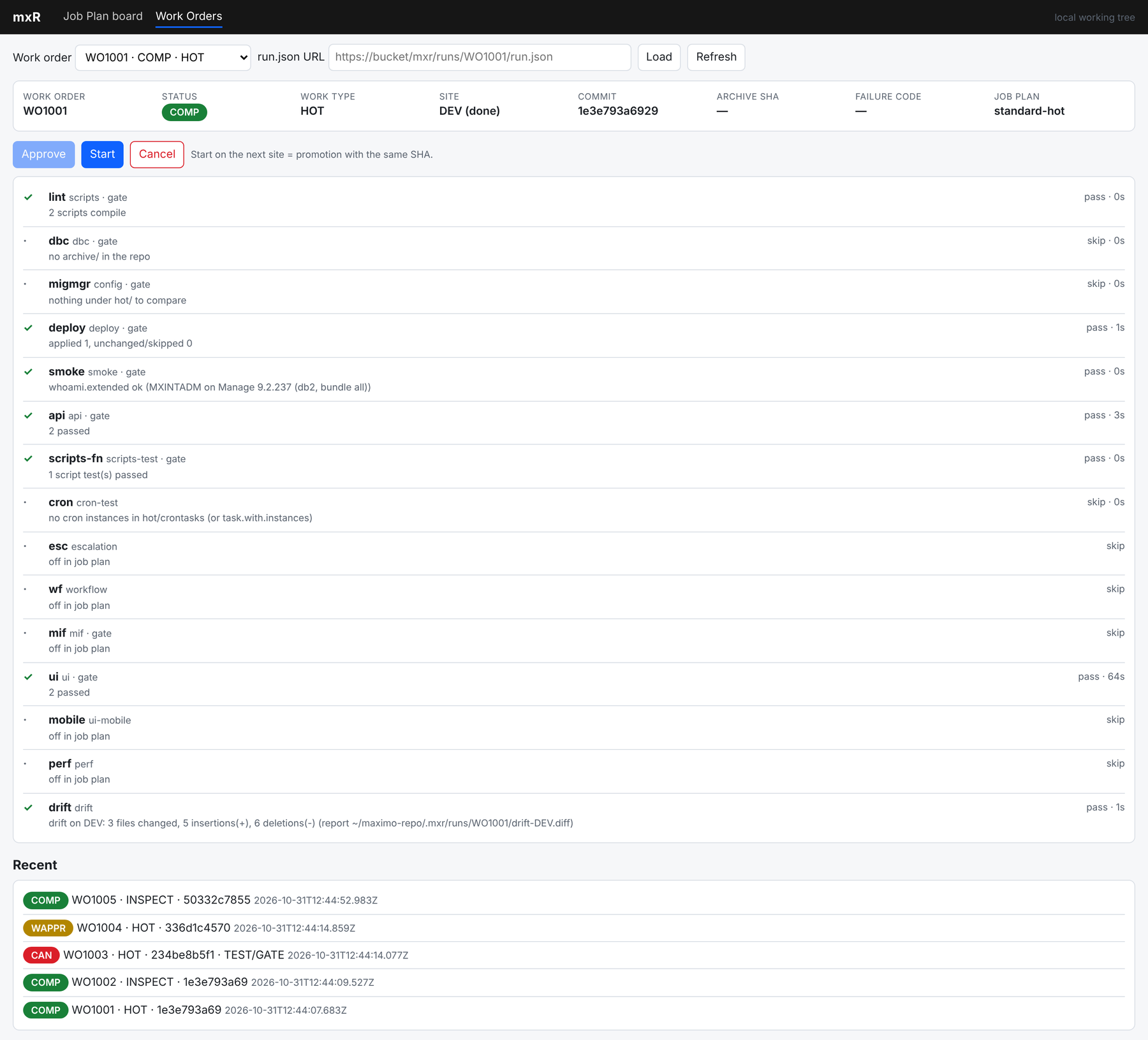
The palette has a Golden card, with app tags and a 10-minute default budget, so the screen check goes onto a site like any other task. The Work Order header shows the failure code on its own, with the full message one hover away. A failed test task names up to five failures in short form and points to the report for the rest. A promotion work order appears here too, with its source and its target.
A change is a work order
The statuses are Maximo's own; the records live in your repo folder and the run record, never as records in Maximo. A gated failure holds INPRG, and the same command resumes it.
- WAPPR — mxr plan or mxr promote plan: raised from what changed (a Git diff, or the difference between two saved versions), or from what differs between two sites, with the job plan for its tier
- APPR — mxr approve: or self-approved and recorded where the site has no approval gate
- INPRG — mxr start: deploy for the tier, then every task in the job plan
- COMP — gated tasks pass: the same work order starts on the next site, same commit
- CAN — mxr cancel --code: one failure code and the recovery runbook, filled in
One run on a live Maximo Application Suite Manage, start to finish
Every command here ran against Manage 9.2.237. The output is what the terminal showed, with the host, the tenant and the operator masked. The documentation carries all sixteen steps.
$ mxr start WO1001
WO1001 auto-approved by maximo.admin (no approval gate on DEV)
MXR.AGENT unchanged (0.3.1)
WO1001 HOT → DEV  (standard-hot)
▶ lint (scripts, gate, budget 2m)
✓ lint         pass  2 scripts compile
▶ dbc (dbc, gate, budget 2m)
· dbc          skip  no archive/ in the repo
▶ migmgr (config, gate, budget 10m)
· migmgr       skip  nothing under hot/ to compare
▶ deploy (deploy, gate, budget 2h30m)
pre-push export: 2 file(s) → ~/maximo-repo/.mxr/runs/WO1001/export-before/DEV
  preview scripts          MXR_DEMO_HELLO               create  jython, 0 launch point(s)
  ✓ scripts          MXR_DEMO_HELLO               applied
✓ deploy       pass  applied 1, unchanged/skipped 0
▶ smoke (smoke, gate, budget 5m)
✓ smoke        pass  whoami.extended ok (MXINTADM on Manage 9.2.237 (db2, bundle all))
▶ api (api, gate, budget 10m)
✓ api          pass  2 passed
▶ scripts-fn (scripts-test, gate, budget 5m)
✓ scripts-fn   pass  1 script test(s) passed
▶ cron (cron-test, budget 5m)
· cron         skip  no cron instances in hot/crontasks (or task.with.instances)
▶ ui (ui, gate, budget 15m)
✓ ui           pass  2 passed
▶ drift (drift, budget 10m)
✓ drift        pass  drift on DEV: 3 files changed, 5 insertions(+), 6 deletions(-) (report ~/maximo-repo/.mxr/runs/WO1001/drift-DEV.diff)
✓ WO1001 COMP on DEV

WO1001  COMP  HOT  commit 1e3e793a6929
job plan: standard-hot  (10 tasks on, 8 gated)
changed paths: 16
site DEV: done
  [G] lint         scripts       pass     2 scripts compile
  [G] dbc          dbc           skip     no archive/ in the repo
  [G] migmgr       config        skip     nothing under hot/ to compare
  [G] deploy       deploy        pass     applied 1, unchanged/skipped 0
  [G] smoke        smoke         pass     whoami.extended ok (MXINTADM on Manage 9.2.237 (db2, bundle all))
  [G] api          api           pass     2 passed
  [G] scripts-fn   scripts-test  pass     1 script test(s) passed
  [ ] cron         cron-test     skip     no cron instances in hot/crontasks (or task.with.instances)
  [ ] esc          escalation    skip     off in job plan
  [ ] wf           workflow      skip     off in job plan
  [G] mif          mif           skip     off in job plan
  [G] ui           ui            pass     2 passed
  [ ] mobile       ui-mobile     skip     off in job plan
  [ ] perf         perf          skip     off in job plan
[ ] drift drift pass drift on DEV: 3 files changed, 5 insertions(+), 6 deletions(-) (report ~/maximo-repo/.mxr/runs/WO1001/drift-DEV.diff)$ mxr start WO1003
WO1003 auto-approved by maximo.admin (no approval gate on DEV)
MXR.AGENT unchanged (0.3.1)
WO1003 HOT → DEV (standard-hot)
▶ lint (scripts, gate, budget 2m)
✗ lint fail 1 of 3 scripts fail to compile: MXR_DEMO_BROKEN.py (no viable alternative at input ':' (line 2))
✗ WO1003 stays INPRG on DEV: TEST/GATE — lint fail: 1 of 3 scripts fail to compile: MXR_DEMO_BROKEN.py (no viable alternative at input ':' (line 2))
re-run: mxr start WO1003 --site DEV (resumes; finished tasks are skipped) cancel: mxr cancel WO1003 --code TEST/GATE
WO1003 INPRG HOT commit 234be8b5f114
job plan: standard-hot (10 tasks on, 8 gated)
changed paths: 4
failure: TEST/GATE — lint fail: 1 of 3 scripts fail to compile: MXR_DEMO_BROKEN.py (no viable alternative at input ':' (line 2))
site DEV: failed
[G] lint scripts fail 1 of 3 scripts fail to compile: MXR_DEMO_BROKEN.py (no viable alternative at input ':' (line 2))
[G] dbc dbc pending
[G] migmgr config pending
[G] deploy deploy pending
[G] smoke smoke pending
[G] api api pending
[G] scripts-fn scripts-test pending
[ ] cron cron-test pending
[ ] esc escalation skip off in job plan
[ ] wf workflow skip off in job plan
[G] mif mif skip off in job plan
[G] ui ui pending
[ ] mobile ui-mobile skip off in job plan
[ ] perf perf skip off in job plan
[ ] drift drift pendingWhat the run leaves in your Maximo
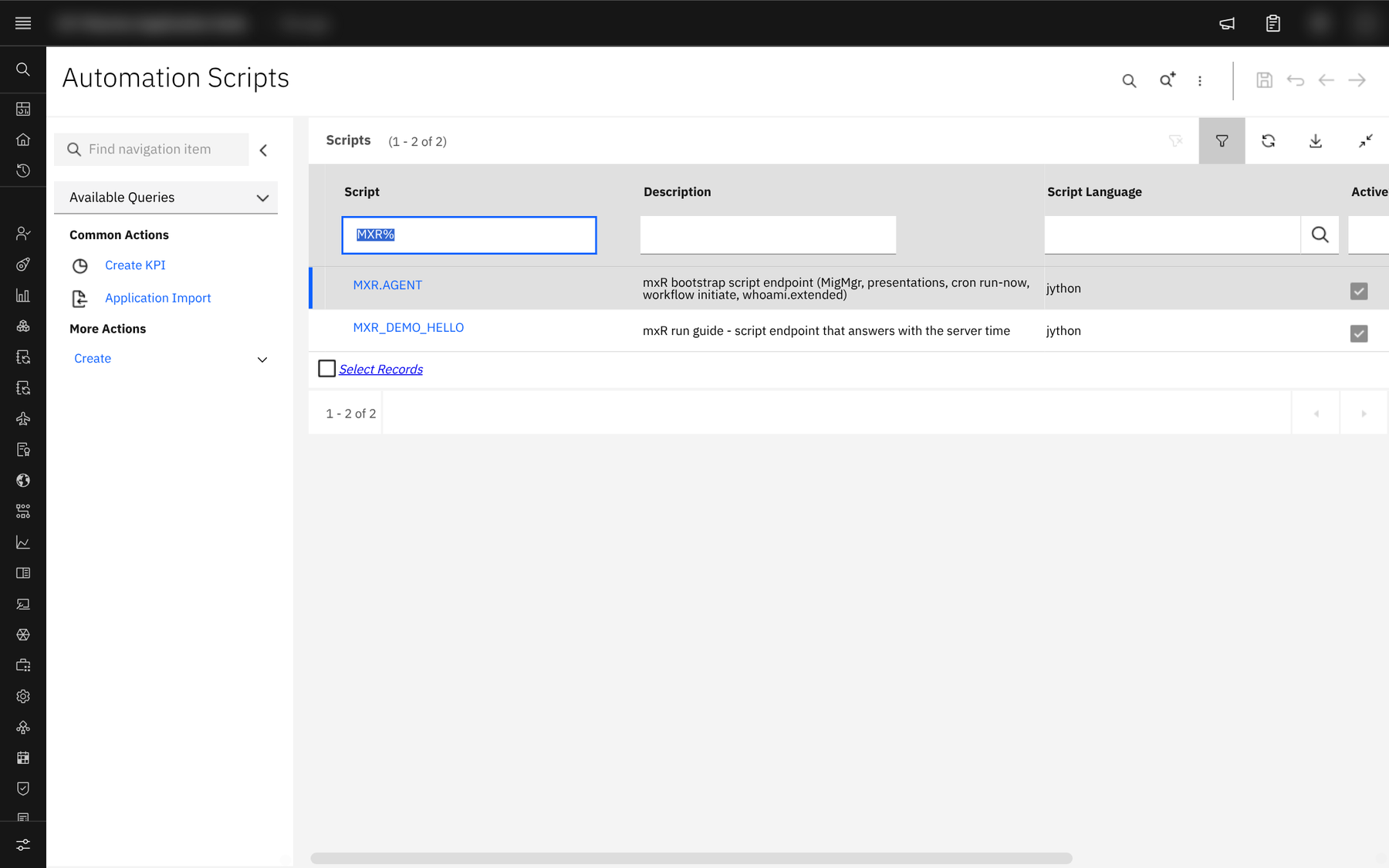
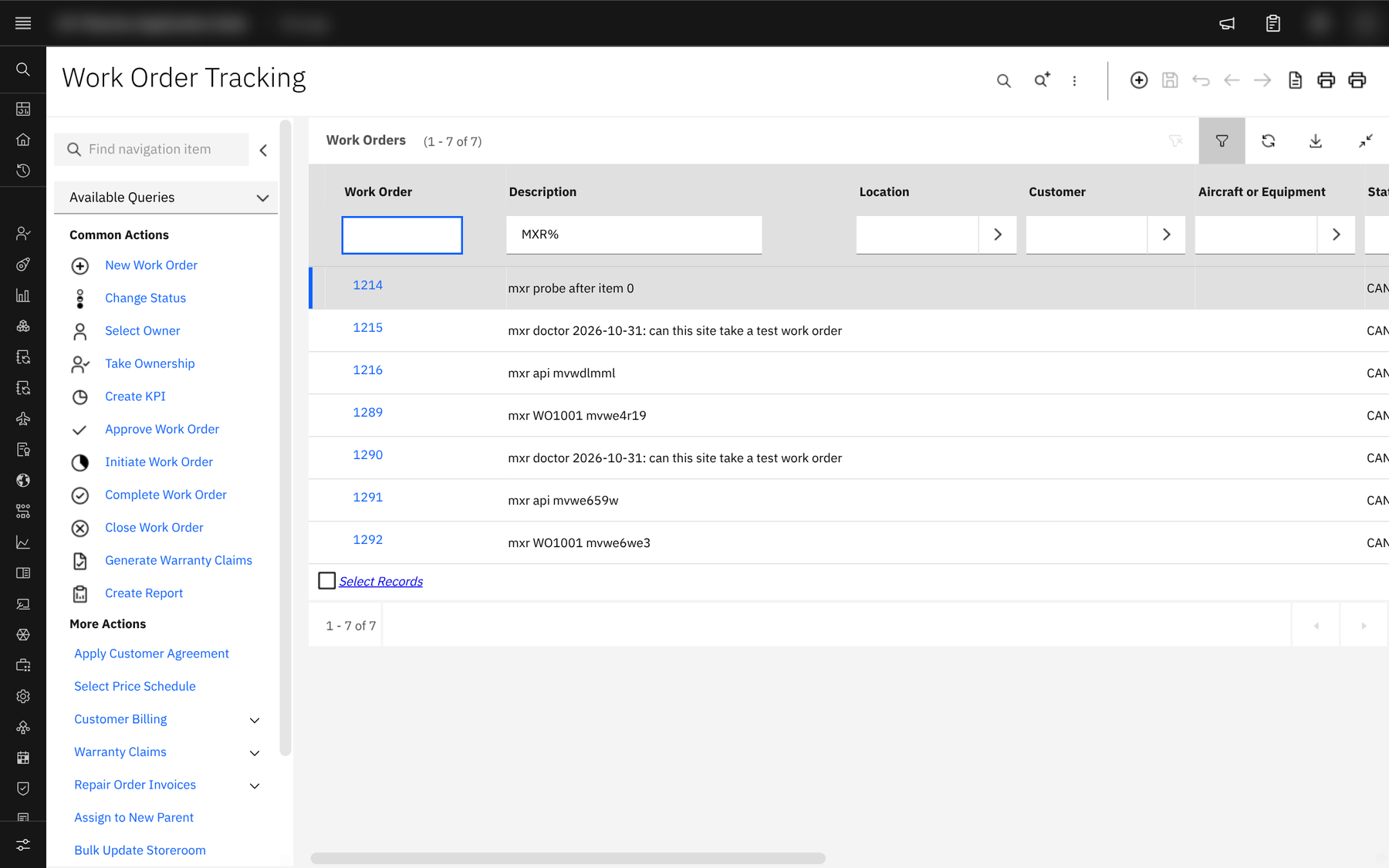
One Jython script, MXR.AGENT, installed through the Automation Scripts object structure, and whatever your work order deployed. Tests create their records on the test site and cancel them.
Your Maximo, your runner
- Proven and built for — Proven on Manage 9.2.232 and 9.2.237, built for every release IBM supports. Hot changes are proven end to end on Manage 9.2.232, and on 9.2.237 with the Aviation and Service Provider add-ons. Every call goes through /maximo/api with an API key, and the agent is a Jython script Manage runs itself, so the same commands and job plans are built for every Manage release in IBM's support window. Release by release results are in docs/support-matrix.md in the mxR repo.
- Add-ons and industry solutions — Aviation, Oil and Gas, Utilities, Nuclear, Transportation, Health, Civil Infrastructure, Scheduler, Mobile, Spatial. An industry solution adds applications, objects and scripts; it does not add a new way to deploy them. A script, a presentation, a Migration Manager package or a MAF app from an industry solution goes in through the same deployer, and the UI journeys take the app tags of the applications you run. This run was captured on a Maximo Aviation lab (Manage 9.2.237 with the Aviation and Service Provider add-ons), where doctor found the one add-on field that refused every work order and named it before a test ran.
- Your runner — Tekton, Azure DevOps, GitHub Actions, GitLab CI, Jenkins. mxR is a Node CLI (22 LTS; 20 still runs). Run it from your laptop, from a Tekton Task on the cluster, or from the stage of the pipeline tool your company already runs. Your repo folder stays the source of truth wherever it is called from, with Git or without.
Put it in your Maximo
One key, one init, one doctor. The first work order follows your first commit.
From an empty repo to a completed work order · Windows
npm install -g https://assetize.com.au/mxr/releases/v0.7.1/mxr-0.7.1.tgz   # free, Apache-2.0. Node 22 LTS (20 still runs)
$env:MXR_DEV_APIKEY = [Net.NetworkCredential]::new('', (Read-Host 'API key' -AsSecureString)).Password   # paste the key: kept in this session, out of history

mxr init --site DEV --url https://<host>/maximo     # mxr.yaml, sites/DEV.yaml and four job plans
mxr doctor                                          # the key, the agent, the grants; cluster checks switch on when a site names one
mxr export --all                                        # the live site becomes the baseline; with Git, commit it: git add -A && git commit -m "mxr bootstrap"

# change something under hot/ (with Git, commit it), then:
mxr plan                                            # the diff decides the tier and raises WO1001
mxr start WO1001                                    # deploy, job plan, COMP on DEV
mxr start WO1001 --site UAT --backup-ref db2-2026-10-31    # next environment: same work order, same version
mxr promote plan --from DEV --to UAT                # or raise one from two sites: what differs, approved as one list
mxr ui                                              # the board and the Work Order screen on localhost
mxr history list                                    # no Git needed: every version mxr recorded, and what changed
From an empty repo to a completed work order · macOS
npm install -g https://assetize.com.au/mxr/releases/v0.7.1/mxr-0.7.1.tgz   # free, Apache-2.0. Node 22 LTS (20 still runs)
read -rs MXR_DEV_APIKEY && export MXR_DEV_APIKEY   # paste the key: the only secret, kept in the environment and out of shell history

mxr init --site DEV --url https://<host>/maximo     # mxr.yaml, sites/DEV.yaml and four job plans
mxr doctor                                          # the key, the agent, the grants; cluster checks switch on when a site names one
mxr export --all                                        # the live site becomes the baseline; with Git, commit it: git add -A && git commit -m "mxr bootstrap"

# change something under hot/ (with Git, commit it), then:
mxr plan                                            # the diff decides the tier and raises WO1001
mxr start WO1001                                    # deploy, job plan, COMP on DEV
mxr start WO1001 --site UAT --backup-ref db2-2026-10-31    # next environment: same work order, same version
mxr promote plan --from DEV --to UAT                # or raise one from two sites: what differs, approved as one list
mxr ui                                              # the board and the Work Order screen on localhost
mxr history list                                    # no Git needed: every version mxr recorded, and what changed
From an empty repo to a completed work order · Linux
npm install -g https://assetize.com.au/mxr/releases/v0.7.1/mxr-0.7.1.tgz   # free, Apache-2.0. Node 22 LTS (20 still runs)
read -rs MXR_DEV_APIKEY && export MXR_DEV_APIKEY   # paste the key: the only secret, kept in the environment and out of shell history

mxr init --site DEV --url https://<host>/maximo     # mxr.yaml, sites/DEV.yaml and four job plans
mxr doctor                                          # the key, the agent, the grants; cluster checks switch on when a site names one
mxr export --all                                        # the live site becomes the baseline; with Git, commit it: git add -A && git commit -m "mxr bootstrap"

# change something under hot/ (with Git, commit it), then:
mxr plan                                            # the diff decides the tier and raises WO1001
mxr start WO1001                                    # deploy, job plan, COMP on DEV
mxr start WO1001 --site UAT --backup-ref db2-2026-10-31    # next environment: same work order, same version
mxr promote plan --from DEV --to UAT                # or raise one from two sites: what differs, approved as one list
mxr ui                                              # the board and the Work Order screen on localhost
mxr history list # no Git needed: every version mxr recorded, and what changed- 01 · Prove the key — mxr doctor. The key through whoami, the agent installed and versioned, the key's groups and the Automation Scripts grants it needs. Each line is pass or fail with the fix.
- 02 · Raise the work order — mxr plan. Diff against the deployed sha, decide the tier by the path rule, raise the work order WAPPR with the job plan for its tier, and say why for every path.
- 03 · Work it site by site — mxr start WO1001. Preview, apply in order, run the job plan, COMP. Then UAT with a backup reference, then PROD inside a window with an approval. Same work order, same version.
Thirteen commands
Human-readable output by default, --json for machines, --verbose logs every Manage request as METHOD path → status ms. Exit codes: 0 ok, 1 task failed, 2 gate blocked, 3 infrastructure or auth, 4 bad input.
| Command | What it does |
|---|---|
| mxr init --site DEV --url … | Write mxr.yaml, the site file and the four job plans. With the key exported it reads the key's user and where that user creates test records. One key is all a site needs. |
| mxr doctor | The key through whoami, MXR.AGENT installed or updated through the Automation Scripts object structure, the key's groups and grants, one work order created and cancelled on the test site (validated and discarded with virtual records), then cluster identity and RBAC asked of the API server itself, the bucket and the admin image for the sites that use them. A site that refuses the test record is named with the attribute, its default and its field class. Pass or fail with the fix on every line. |
| mxr export | Pull the live hot artefacts into hot/ with stable names and sorted keys, following the site's export filters. Drift is what changed since the last recorded version: git diff with Git, mxr history diff without. --all --children reads each record's child rows too, as mxr promote plan does. |
| mxr plan | Diff against the deployed version (the ManageWorkspace annotation, the last completed work order on a site without one, or what mxr export recorded without Git), decide the tier by the path rule, build the archive for a REBUILD, raise the work order WAPPR and print why. |
| mxr promote plan --from DEV --to UAT | Export two sites, list what differs (new, changed, only on the target, excluded) and raise a work order WAPPR with each item's tier, its sha256 and the list hash. --dry-run prints the list; --refresh <wo> makes it again and sends an approved work order back to WAPPR when the list changed. |
| mxr approve <wo> | APPR, with the approver recorded, and for a promotion the hash of the list approved. Required for PROD and for every REBUILD, which also carries a backup reference and a window. |
| mxr start <wo> | INPRG: deploy for the tier, run the job plan, COMP when every gated task passes. The same command on the next site is promotion of the same commit or saved version; without Git it deploys the files of the version the work order recorded, whatever has changed in the folder since. A promotion work order starts on its target, after reading the source again and checking every approved item against its hash. Re-running resumes: every hot item is previewed against the site again and the ones recorded as applied are kept; --dry-run previews everything and writes nothing. |
| mxr inspect --jobplan drift | Tests only, no deploy: an inspection work order. Nightly drift and the weekly UI run are inspections. --promotion <wo> prints a promotion's approved list, its approvals and what was applied; --diff --from UAT --to PROD prints what differs between two sites now. |
| mxr cancel <wo> --code … | CAN with one failure code, then the recovery runbook for that code with the work order, the site and the paths filled in. A rebuild is recovered by a person, from the runbook. |
| mxr pm add … | A scheduled inspection (a PM): the schedule goes into mxr.yaml and a Tekton CronJob next to it. |
| mxr pipeline render | The same run as a Tekton PipelineRun: one Task that runs mxr, one parameter per job plan task, chained in order. |
| mxr ui | The Job Plan board and the Work Order screen, one static page on localhost. Saves are commits through the GitHub or GitLab API with your own token, or a save to the working tree when there is no Git; the next mxr run records it. |
| mxr history list | diff | restore | export-git | The version history mxR keeps in .mxr/history when there is no Git: every version with who, when and what changed; the lines that changed between any two; the folder put back as it was (a dry run unless --apply, and the folder as it is now is recorded first); and one Git commit per version for the day you move to Git. |