MXH and mxR are free: assess your Maximo upgrade, then prove every fix
MXH finds what your Maximo upgrade breaks. mxR proves each fix on the upgraded site. Both are free.
An upgrade assessment lists what must change. Then someone has to prove each change is done on the new system, and that usually ends up in a spreadsheet.
Both are free
MXH reads your Maximo before an upgrade and tells you what the move changes: your objects, screens, scripts and Java. From version 0.13.0, MXH and its data packs are free.
mxR moves every Maximo change as a work order, one site at a time, and tests it. From version 0.7.1 it is free and open source (Apache-2.0).
Together they cover the whole upgrade. MXH says what has to change. mxR proves each change on the upgraded system.
Everything below is a real run from 8 November 2026, on Kestrel Energy, a made-up oil and gas company moving from 7.6.1.3 to 9.2. Long output is cut to the lines that matter.
1. Install MXH
You need Java 17 or newer. One command installs MXH and checks the download. On Windows, run irm https://assetize.com.au/mxh/install.ps1 | iex in PowerShell instead.
$ curl -fsSL https://assetize.com.au/mxh/install.sh | sh
installed mxh 0.13.0 (checksum verified)
…
mxh 0.13.0 (metadata packs 2026.09)
packs: free to use, no key needed (LICENSE-PACKS.md)
2. Find what the upgrade changes
Point MXH at your data dictionary export and your custom code. On Kestrel it found 22 things the move to 9.2 changes, and grouped them into 8 work packages.
Open readiness.html to read them. Each work package says what to do, who owns it, and how you will know it is done.
$ mxh assess --from kestrel --output build/assessment
assess 7.6.1.3 -> 9.2: 1 blocking, 13 review, 8 environment-dependent …
  report: build/assessment/assessment.md
3. Install mxR and connect your test site
You need Node 22. Install mxR with npm, set the API key for your upgraded test site, and run mxr init. It checks the key and finds the site to test on. You do not need Git.
$ npm install -g https://assetize.com.au/mxr/releases/v0.7.1/mxr-0.7.1.tgz
$ mxr init --site UAT --url https://<uat-host>/maximo
✓ wrote mxr.yaml
…
✓ MXR_UAT_APIKEY works: MXRINT, tests on org EAGLENA site BEDFORD
4. Turn each work package into a check
One command reads MXH’s results and writes one check for each work package. mxR picks the right kind of check:
Java changes: build your code against 9.2. Removed fields: confirm they are gone. Your own fields: confirm they came across. Anything that needs judgement: a person signs it off.
$ mxr mxh plan assessment.json
MXH 7.6.1.3 → 9.2 (Kestrel Energy): 8 work packages → 7 closure tasks
wrote jobplans/mxh-closure.yaml and tests/mxh/closure.json
5. Run the checks on the upgraded site
mxr inspect runs every check on your upgraded test site. It only reads, so it is safe on any site.
On Kestrel, the removed fields are gone and the screen field came across. 6 of Kestrel’s own fields did not come across, and mxR names each one. 3 changes wait for sign-off, and the Java checks wait for Kestrel’s code.
$ mxr inspect --site UAT --jobplan mxh-closure
WO1001 INSPECT → UAT  (mxh-closure)
· mxh-compile  skip  no archive/*/java/pom.xml
✗ mxh-wp-cf44bbb5 fail  WP-cf44bbb5: waiting for a review decision in tests/mxh/closure.json …
✓ mxh-wp-232873dd pass  WP-232873dd: ASSET.PLUSSGEOJSON absent, expected absent; …
…
✓ mxh-wp-253434f3 pass  WP-253434f3: ASSET.KEINSPECTIONCLASS exists (ALN, 20), expected present
✗ mxh-wp-1af3c60d fail  WP-1af3c60d: … FAILUREREPORT.KEROOTCAUSECODE absent, expected present ✗; …
✓ WO1001 COMP
6. See what is done, and hold go-live
mxr mxh close counts each work package as closed, open or not run. While anything is open it exits with code 2, so your pipeline can hold go-live until everything is done.
$ mxr mxh close WO1001
WO1001 on UAT (COMP): 2 closed, 4 open, 2 not run of 8 MXH work packages
…
next: close the open work packages, then run mxr inspect --site UAT --jobplan mxh-closure again
$ echo $?
2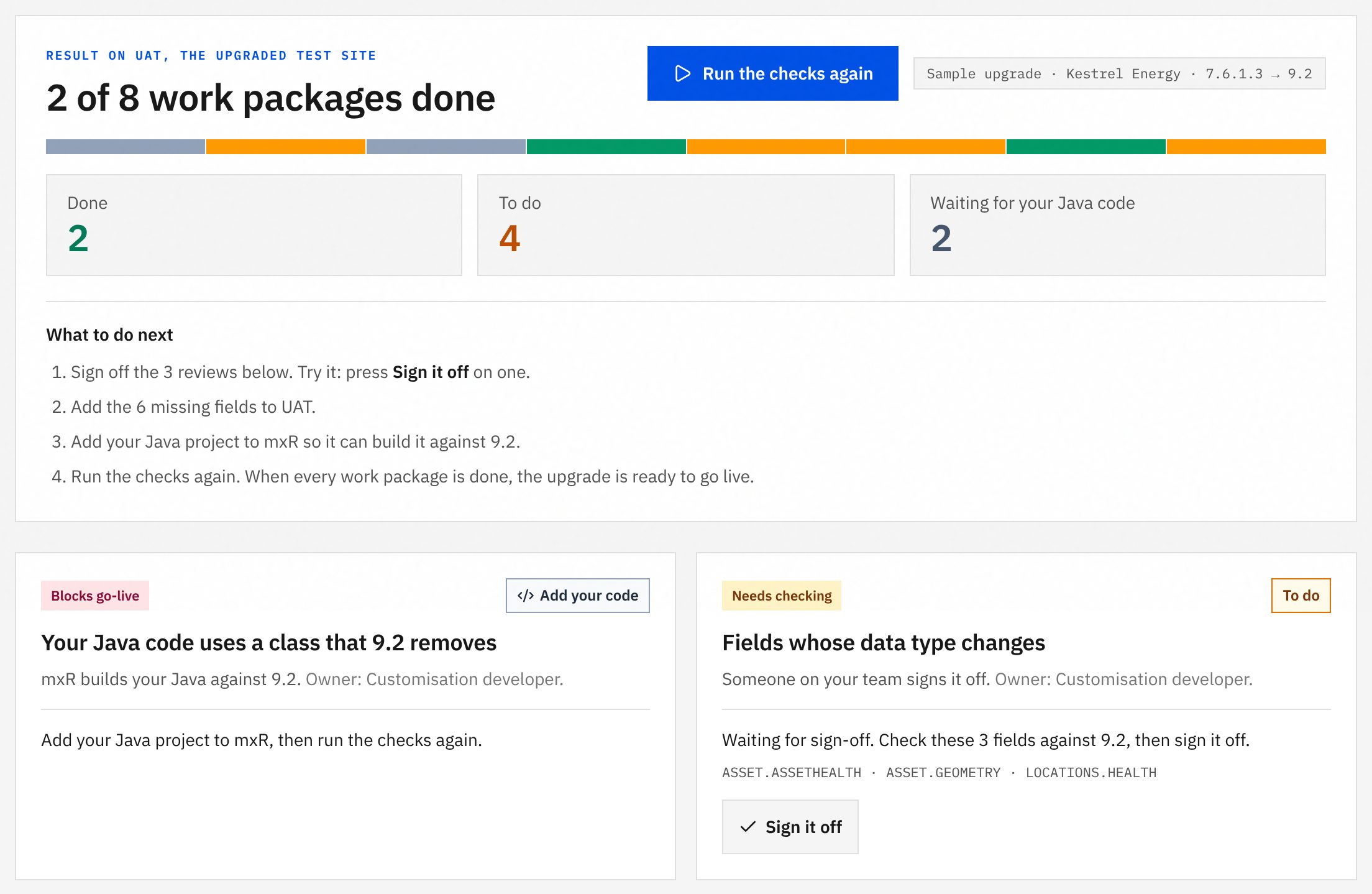
7. Sign off a change, and run it again
Some changes need a person to look. The reviewer writes who, when, the outcome and why into tests/mxh/closure.json. The next run counts it as done.
# tests/mxh/closure.json (excerpt)
"decision": {
  "by": "j.citizen",
  "at": "2026-11-08T10:00:00Z",
  "outcome": "unaffected",
  "reason": "ASSETHEALTH, GEOMETRY and HEALTH are read only by the asset health report, …"
}

$ mxr mxh close WO1002
WO1002 on UAT (COMP): 3 closed, 3 open, 2 not run of 8 MXH work packages
Two checks after the upgrade
MXH can also check an export of the upgraded system (mxh verify-closure). mxR checks the live site. Use both, and every fix is proved in the data and on the running system.
Try it
See the whole thing in your browser first at /mxr/mxh. Then run it on your own Maximo: get MXH at /mxh/start and mxR at /mxr. The guides are at /mxh/docs and /mxr/docs.
curl -fsSL https://assetize.com.au/mxh/install.sh | sh                    # MXH, free
npm install -g https://assetize.com.au/mxr/releases/v0.7.1/mxr-0.7.1.tgz   # mxR, free
mxh assess --from ./your-package --output build/assessment
mxr init --site UAT --url https://<uat-host>/maximo
mxr mxh plan build/assessment/assessment.json
mxr inspect --site UAT --jobplan mxh-closure
mxr mxh close <WO>
Sources
- MXH 0.13.0 release and LICENSE-PACKS.md (packs free to use)
- mxR 0.7.1 changelog and LICENSE (Apache-2.0)
- MXH command reference: assess and verify-closure
- mxR run guide and reference
- The runs in this article: MXH 0.13.0 on its Kestrel Energy demonstration package; mxR 0.7.1 against its Manage simulator set up as Kestrel’s UAT
- MXH to mxR, the interactive walkthrough